
Order an Official Transcript
WCC has partnered with Parchment to provide electronic transcripts through online transcript ordering. All current and former students can order transcripts online anytime. Requesting a transcript online is quick and easy and you will receive automated status updates via email. The electronic pdfs are sent to a designated email account within a couple hours. To place your order you will need an email address to set up your Parchment account if you do not already have one, student ID number or Social Security Number, and a credit or debit card.
You do still have the option to pick up or have your transcript mailed as well, electronically sending it will just be the quickest option.
Order an Official Transcript Now
If you are experiencing any trouble, please see the instructional videos below for assistance:
Need a copy of your Unofficial Transcript
Login to your account to view and print an unofficial copy of your transcript. If you cannot log in to your account, please follow the instructions to order your official transcripts.
Transcript Frequently Asked Questions
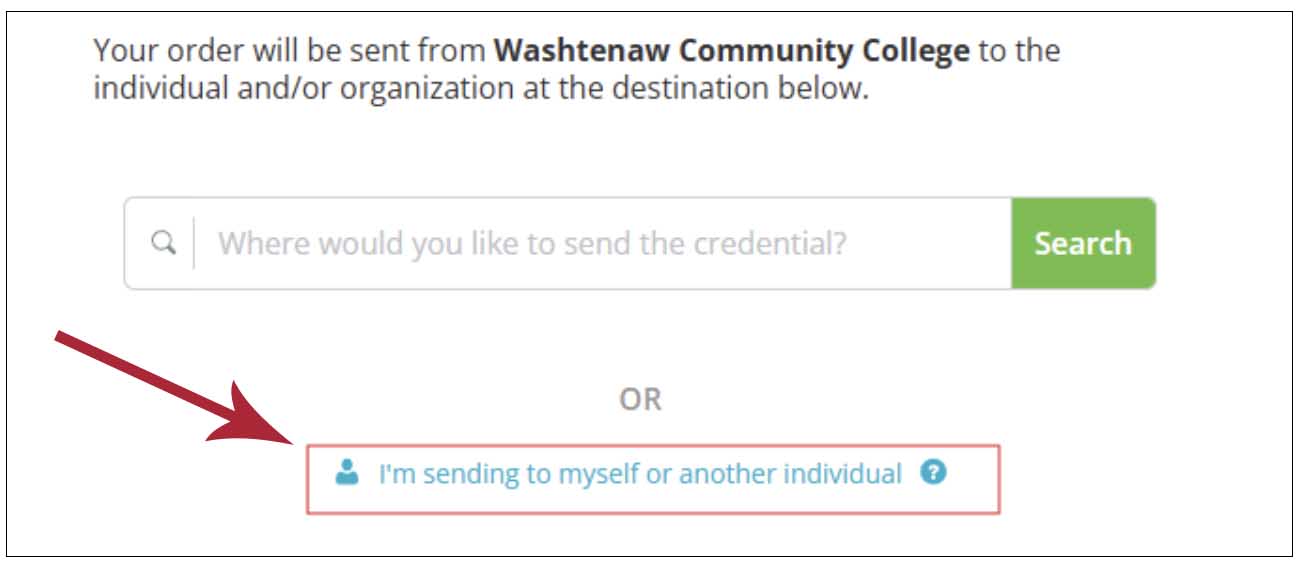
You can still request a transcript online directly from Parchment. However, we are only able to process your request as a print and mail order. If you select electronic delivery when you order your order will be canceled, you will be issued a credit and you will need to place a new order. When placing a mail order you will want to select the “I’m sending to myself or another individual” option:
Select “Print and Mailed” at the top of the next screen:
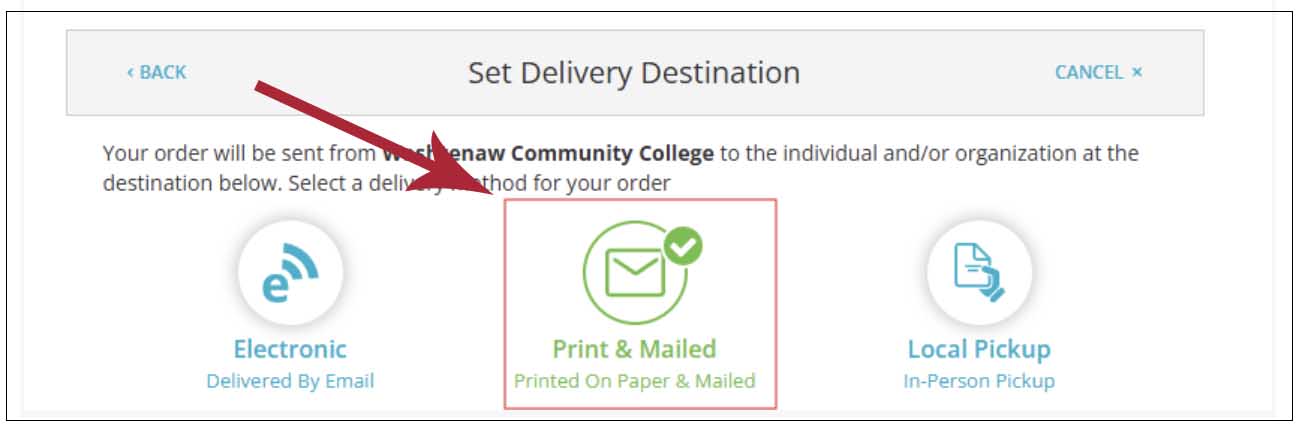
Then, manually type in the address of where you would like the transcript sent.
No. In an effort to best protect student information and comply with FERPA, you must submit a request through the Parchment site.
Complying with FERPA, WCC requires that official transcripts be requested and/or picked up by the student only. If the student wants to pick up an official transcript, he/she can do so at the Welcome Center after photo identification has been provided.
You will be able to upload attachments when you request your official transcript.
Once your degree/certificate has been awarded (typically 4–6 weeks after final grades for your graduation term are posted), it will appear on both your official and unofficial transcript. You will also receive an email notification confirming that your degree has been awarded.
Before ordering an official transcript, we strongly recommend reviewing your unofficial transcript in MyWCC (Student Services Dashboard > View Academic Transcript) to verify that your degree appears on your transcript.
To have the Michigan Transfer Agreement (MTA) posted to your transcript, submit an application for graduation and select "WCC Certificate" and "Liberal Arts MTA."
Once we confirm that the MTA requirements have been satisfied, you will receive an email confirming once the MTA comment has been posted to your transcript. If your transfer institution requires the MTA, please wait to order your transcript until after you receive this confirmation.
No, the official transcript is a record of all academic work attempted at WCC. It is not possible to omit individual courses or semesters.
You will either need to come to the WCC Welcome Center in person or join us in zoom so we can check your government-issued ID and then give you your Student ID number verbally.
Send Now: Your transcript will be sent immediately with the information currently posted to your academic record. Current students and recent graduates should review their unofficial transcript before selecting this option to confirm that all expected final grades, degrees, and certificates have been posted.
Hold for Grades: Your transcript will be held until all final grades for the current semester have been posted. Once semester grades have been posted, the transcript will be released automatically.
Students enrolled in early ending classes who need their transcript sent before the end of the semester should monitor their unofficial transcript and select “Send Now” after confirming that their final grade has been posted. Grades for early ending classes are typically posted within one to two weeks after the scheduled end date.
Hold for Degree: Your transcript will be held until all degrees and certificates for the current award cycle have been posted. This process is typically completed approximately 4–6 weeks after the semester ends, after which the transcript will be released automatically.
Graduates of competitive healthcare programs who need an expedited transcript for state licensure should monitor their unofficial transcript and select the “Send Now” option once all required final grades have been posted and their degree status shows as "Awarded.”
Noncredit transcript
To view and print your transcript for noncredit classes, login to the noncredit registration site.